
U.S. Passport Photo Requirements: The Complete Checklist
Every current U.S. passport photo rule in one place — the 2 x 2 size and head-size spec, background, expression, clothing, glasses, digital file requirements, and the no-editing rules, with a printable checklist.
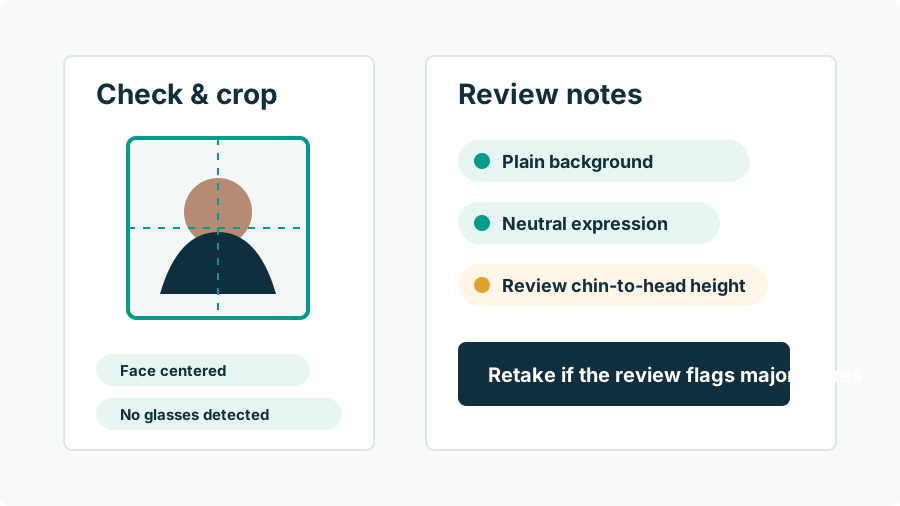
What are the U.S. passport photo requirements in full?
Here is the complete current specification, condensed from the State Department's published guidance into one reference table:
| Category | Requirement |
|---|---|
| Size | 2 x 2 inches (51 x 51 mm), square |
| Head size | 1 to 1 3/8 inches (25–35 mm), chin to top of head, centered, fully visible |
| Recency | Taken within the last 6 months, reflecting current appearance |
| Color | Color photo — sharp, not grainy, pixelated, or filtered |
| Background | Plain white or off-white; no shadows, textures, or objects |
| Pose | Full face, directly facing the camera, head not tilted |
| Expression | Neutral, mouth closed, both eyes open and visible |
| Glasses | Not allowed; medical exception with signed doctor's statement |
| Head coverings | Not allowed; religious/medical exceptions with documentation, full face visible |
| Clothing | Normal attire; no uniforms, uniform-like clothing, or camouflage |
| Accessories | No headphones or hands-free devices; jewelry/piercings OK if the face stays visible |
| Editing | Original, unedited photo — no filters, digital changes, or AI-created/edited images |
| Photo-quality paper (matte or glossy); no photocopies or scanned prints | |
| Digital upload | JPG/JPEG/PNG/HEIC/HEIF, 54 KB–10 MB, a true camera original |
How is the photo composed correctly?
Composition is the numeric heart of the spec. Within the 2 x 2 inch square, your head must measure between 1 and 1 3/8 inches from the bottom of the chin to the top of the head — about 50–69% of the frame's height — centered horizontally, with the eyes landing a little above the frame's vertical midpoint and the bottom edge cutting around the shoulder line. You face the camera dead-on: both ears equally implied, chin level, no tilt, no three-quarter angle. These proportions are why casual photos rarely work as-is (heads too small) and selfies fail (too large, distorted) — and why the practical workflow is shooting wide and letting measured cropping produce the geometry. The size and crop guide goes deeper on getting this right.
What do the lighting and background rules require?
The background must be plain white or off-white with no shadows, textures, or objects — one continuous light surface behind your whole head and shoulders. Lighting must render your face evenly and naturally: no shadows across the face, no glare, no red-eye, accurate skin tones. In practice both rules are solved by the same setup — stand 3 to 6 feet in front of a bare light wall so your shadow falls behind you onto the floor, and face a window so soft daylight illuminates you frontally. Flash against the wall, single side lamps, and overhead-only fixtures are the classic saboteurs. Critically, background problems must be fixed physically, not digitally: repainting the wall in software is a prohibited edit, as covered in the background guide.
What are the appearance and expression rules?
Neutral expression, mouth closed, both eyes open and visible — the face at rest, looking straight into the lens. Glasses come off (banned since November 2016, narrow medical exception with a signed statement). Hats and head coverings come off, except documented daily religious wear or medical necessity, and even then the full face must be visible with nothing shadowing it. Hair cannot cover the face. Clothing is your normal daily attire, minus uniforms, uniform-like garments, and camouflage; headphones and earpieces are out; jewelry and piercings may stay if they hide nothing. Babies get realistic accommodations — eyes not entirely open is acceptable, and no other person (including a steadying hand) may appear. The rules read long, but they compress to one sentence: an unobstructed, unexaggerated, current version of your actual face.
What do the anti-editing rules prohibit?
Everything beyond formatting. The State Department requires "the original, unedited photo without filters or digital changes" and — in the online renewal rules — says plainly: "Do not use a photo you created or edited using artificial intelligence or other digital tools." That excludes beauty filters, skin smoothing, Portrait-mode blur, background replacement, digital glasses removal, expression fixes, re-posed faces, and fully AI-generated portraits. It permits what preparation genuinely requires: cropping to the 2 x 2 geometry, resizing for upload, and arranging prints on a sheet — operations that select pixels without changing them. Online renewal uploads also pass an automated government photo check before human review, so manipulated images face two screens. The full reasoning and edge cases live in our AI editing rules guide; the short version is absolute: fix problems in front of the camera, never after.
How do you run the final check before submitting?
- Recency: taken within 6 months of submission, looking like you do today.
- Geometry: square frame, head centered, chin-to-crown filling roughly half to two-thirds of the height — measured, not guessed. Passport Photo AI builds this crop from your unedited original and flags composition problems automatically.
- Background: white/off-white, evenly lit, boringly empty.
- Face: straight-on, neutral, mouth closed, eyes open, no glasses, no hat, hair clear of the face.
- Integrity: zero edits — the file is the camera's original, or the print is that original on photo paper at a verified 2 x 2 inches.
- Official cross-check: read the current requirements at travel.state.gov once before submitting; the pages are short and they are the authority.
Clear all six and you've met every published requirement. Acceptance is still the passport agency's call — no tool or guide can promise it — but at that point the photo has given them no stated reason to say no.
FAQ
What are the basic U.S. passport photo requirements?
A color photo taken in the last 6 months: 2 x 2 inches, head 1 to 1 3/8 inches chin-to-crown and centered, plain white or off-white background, neutral expression with mouth closed and both eyes open, facing the camera directly, no glasses, no hat, and no digital editing of any kind.
Are the rules different for the online renewal photo?
Composition rules are identical; the deliverable differs. Online renewal takes a digital file — JPG/JPEG/PNG/HEIC/HEIF, 54 KB–10 MB, sharp, not a scan of a print — instead of a 2 x 2 print on photo paper.
Can my passport photo be edited or retouched at all?
No. Guidance requires the original, unedited photo without filters or digital changes and explicitly rejects photos created or edited with AI tools. Only cropping, resizing, and print layout — which don't alter content — are part of normal preparation.
Do children follow the same requirements?
Yes, with infant allowances: a baby's eyes need not be entirely open, positioning aids like a blanket or draped car seat are expected, and no other person may appear in the photo. Older children meet the standard adult rules.
Who decides whether my photo is acceptable?
The acceptance agent at filing and the passport agency during processing — and for online renewal, an automated check screens the upload first. No app, kiosk, or photographer can guarantee acceptance; the published requirements are the standard.
Where are the official requirements published?
On travel.state.gov — the passport photos page and, for online renewal, the digital photo upload page. Check them before submitting; details can change and the official pages are the authority.
How Passport Photo AI helps
Passport Photo AI turns an everyday photo into a passport-style crop or print sheet. It centers the face, sizes the head to the official 2 x 2 geometry, flags likely compliance problems like shadows or tilt, and exports both a digital square and a 4 x 6 print layout. It does not alter your appearance in the submission workflow, and the final decision always belongs to the passport agency or acceptance facility — verify your photo against the official requirements before you submit it.