
Will an AI-Edited Photo Get Your Passport Application Rejected?
The State Department now explicitly bans AI-created and AI-edited passport photos. Exactly which edits cross the line, how altered photos get flagged, and the compliant way to use photo software.
What does the State Department actually say about AI photos?
Two official statements, both unambiguous. The passport photo requirements page instructs applicants to "submit the original, unedited photo without filters or digital changes" and lists AI-created images as unacceptable. The online renewal upload page is even more direct: "Do not use a photo you created or edited using artificial intelligence or other digital tools." Together they close both doors — photos generated by AI from scratch and real photos modified by AI or any editing software afterward. This is current, published guidance on travel.state.gov, not a rumor or an overreading, and it reflects a broader tightening: the government has spent years standardizing identity photos (the 2016 glasses ban was the same instinct) and consumer AI editing arrived as the newest large-scale threat to that standard.
Which edits cross the line — and which processing is normal?
The dividing principle: anything that changes what the camera recorded about your appearance or surroundings is an edit; anything that merely selects, scales, or arranges the recorded pixels is formatting.
| Operation | Compliant? | Reasoning |
|---|---|---|
| Cropping to 2 x 2 / resizing for upload | Yes | Selects existing pixels; required by the format itself |
| Laying crops onto a 4 x 6 print sheet | Yes | Arrangement, not alteration |
| Automated compliance checking | Yes | Analysis changes nothing |
| Beauty filters, skin smoothing, blemish removal | No | Alters appearance |
| Portrait-mode blur, background replacement | No | Synthesizes surroundings; "digital changes" |
| Brightness/exposure rescue of a bad shot | Risky | Modifies the image; reshoot in better light instead |
| Opening eyes, closing a smile, removing glasses digitally | No | Direct appearance alteration |
| AI re-posing an angled face to straight-on | No | Fully synthesized view — the strongest form of AI edit |
| Fully AI-generated portrait | No | Explicitly listed as unacceptable |
Why did the rules tighten against AI editing?
Because the passport photo is the reference template for a decade of identity checks, and edited photos quietly corrupt it. Facial recognition systems at borders and in processing measure geometry — eye spacing, jawlines, contours — and AI edits shift those measurements even when the result looks natural to a human: smoothing erases texture used for matching, re-lighting changes apparent contours, re-posing fabricates the entire geometry. There is also a fraud dimension: morphed or substituted faces in official photos are an active security concern worldwide, and a hard no-editing line is far more enforceable than adjudicating degrees of retouching case by case. Seen from the government's side, the rule is not anti-technology — it is the only version of the standard that automated screening can defend at scale.
How do altered photos actually get caught?
Through layered review, none of which you should count on beating. For online renewal, the State Department's automated photo tool screens every upload against the requirements before a human sees the application — and image-forensics signals (edge artifacts around hair from background swaps, statistically too-smooth skin, mismatched lighting and shadows, generative-model fingerprints) are exactly the kind of check automation is good at. Behind it sit human passport specialists who review photos during processing and can reject at that stage, weeks after submission — the expensive kind of rejection, since your application sits while you produce a new photo. Precisely how screening works internally isn't published, and it doesn't need to be: the failure cost lands on you either way. The reliable strategy isn't a subtler edit; it's having nothing to detect.
What should you do if you already submitted an edited photo?
- Don't panic, and don't try to withdraw-and-swap anything sneakily. If the photo passes, it passes; if it's flagged, you'll receive a notice asking for a replacement.
- Prepare the compliant retake now: plain white or off-white wall, soft frontal daylight, rear camera at eye level from four feet, neutral expression, no glasses — and zero post-processing.
- Respond to any photo-correction notice promptly with the genuine original; the application resumes from there.
- Watch your timeline: a photo redo typically adds weeks. If travel is near, factor that in before booking anything nonrefundable.
- Keep the master file: store the untouched original so any future request can be met from the same honest source.
How do you use AI photo tools without risking rejection?
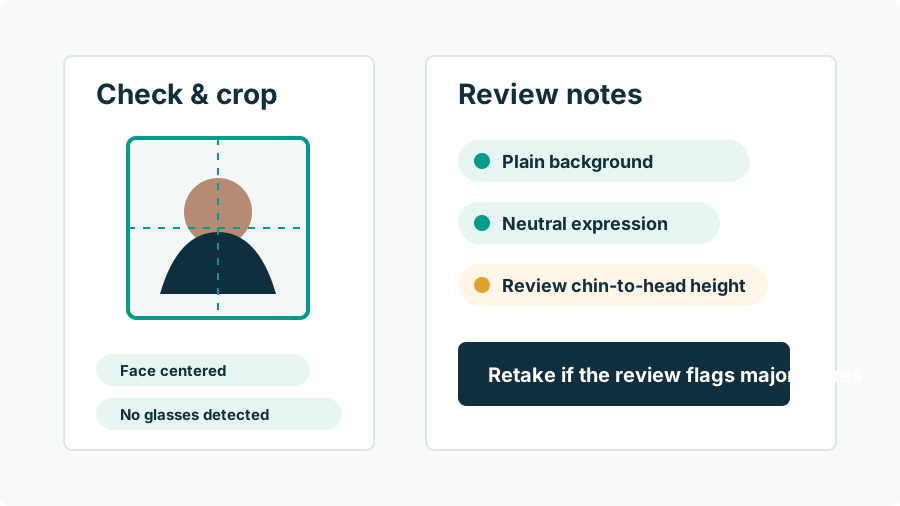
Keep the tool on the formatting side of the line and it is not just safe but genuinely useful — the specification is numeric, and software measures better than eyes. Passport Photo AI is built around that split: for submissions it detects your face, builds the official 2 x 2 crop with the head in the 1–1 3/8 inch band, flags shadows, tilt, background clutter, and quality problems, and exports an upload-ready square plus a kiosk-printable 4 x 6 sheet — your pixels, untouched. Its generative mode (re-posing, background synthesis) stays clearly labeled for previews and non-government uses. No tool can promise acceptance, and the photo you submit is always yours to verify against travel.state.gov — but the compliant division of labor is simple to remember: you and your camera make the photo; software only measures, frames, and prints it.
FAQ
Are AI-edited photos allowed for U.S. passports?
No. Official guidance says to submit the original, unedited photo without filters or digital changes, and states directly: do not use a photo you created or edited using artificial intelligence or other digital tools.
Does that include beauty filters and skin smoothing?
Yes. Any appearance-altering processing — filters, smoothing, teeth whitening, blemish removal, Portrait-mode background blur — conflicts with the unedited-photo requirement, whether or not you'd call it 'AI.'
Is cropping or resizing considered editing?
No. Cropping and resizing select and scale the pixels the camera captured; they're how every passport photo is produced and are fully compliant. The prohibition targets changes to the image's content — your appearance and surroundings.
How would anyone know my photo was AI-edited?
Manipulated images carry tells — edge halos around hair, unnaturally uniform skin texture, lighting that doesn't match across the frame — that automated screening and trained reviewers look for. Online renewal uploads also pass through the State Department's automated photo check before human review.
What happens if my submitted photo gets flagged?
Processing pauses and you're asked for a new, compliant photo, adding weeks to the timeline. The fix is a genuine retake — resubmitting another edited variant risks repeating the cycle.
Can I still use an AI passport photo app at all?
Yes, for the compliant parts: measured 2 x 2 cropping, head-size framing, compliance checks, and print-sheet layout leave your pixels untouched. Use generative features only for non-submission purposes like previews or profile photos.
How Passport Photo AI helps
Passport Photo AI turns an everyday photo into a passport-style crop or print sheet. It centers the face, sizes the head to the official 2 x 2 geometry, flags likely compliance problems like shadows or tilt, and exports both a digital square and a 4 x 6 print layout. It does not alter your appearance in the submission workflow, and the final decision always belongs to the passport agency or acceptance facility — verify your photo against the official requirements before you submit it.