
Why Was Your Passport Photo Rejected? Common Reasons and Fixes
Every major passport photo rejection reason — background, shadows, head size, glasses, expression, editing, print quality — with the specific fix for each and how to resubmit without losing more weeks.
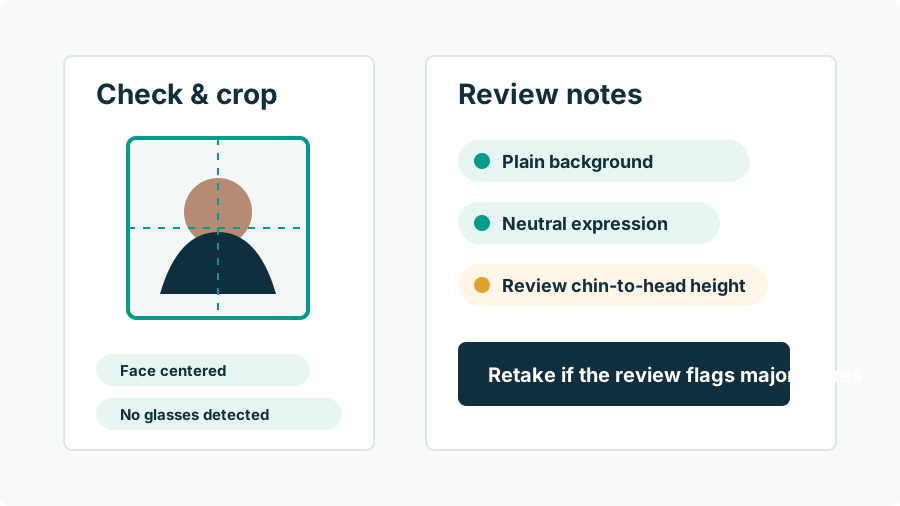
Why do passport photos get rejected?
Because a passport photo is a measurement, not a portrait — and anything that makes the face harder to verify fails the measurement. Rejections cluster into five families: background and lighting (shadows, clutter, gradients), framing (head too large, too small, off-center), appearance (glasses, hats, hair over the face, non-neutral expressions), image quality (blur, grain, compression, bad prints), and — increasingly — digital alteration (filters, retouching, AI edits). The encouraging part: every one of these is a capture-time problem with a capture-time fix. The table below maps the defects reviewers actually cite to what you do about each.
| Rejection reason | The fix |
|---|---|
| Shadows on face or background | Stand 3–6 ft from the wall; face soft window light |
| Background not plain white/off-white | Move to a bare light wall or hang taut white poster board |
| Head too big / too small / off-center | Shoot wide, then crop to the 1–1 3/8 in head-size spec with software |
| Wearing glasses | Take them off (medical exceptions need a signed doctor's statement) |
| Hat, headphones, hair over face | Remove; pull hair back so the full face shows |
| Smiling broadly / mouth open / eyes closed | Neutral expression, mouth closed, both eyes open |
| Blurry, grainy, or pixelated | Rear camera, good light, transfer the original file — no screenshots |
| Filters, retouching, AI edits detected | Retake and submit the untouched original |
| Photo older than 6 months | Take a new one — recency is a hard rule |
| Photocopy / scan / flimsy paper | Print the digital file on real photo paper |
What actually happens after a rejection?
The mechanics depend on how you applied. In person, the acceptance agent may catch the problem at the counter — the cheapest possible rejection, since you can return with a new photo before anything ships. By mail or after an in-person filing, the passport agency's reviewers suspend the application and send a notice describing the defect and how to submit a replacement; your file then sits until you respond, typically adding weeks. For online renewal, the automated photo tool screens the upload immediately and tells you what to change — and a photo that passes the tool can still be rejected later by a human reviewer. None of these outcomes is a denial. But each is a delay, and if travel is booked, delay is the whole ballgame.
Which background and lighting mistakes matter most?
Shadow is enemy number one. A cast shadow behind your head (standing too close to the wall) or across your face (overhead or one-sided light) violates the shadow-free requirement even when everything else is perfect. Second is the not-actually-plain background: door panels, textured paint, wallpaper seams, a picture frame corner, or — in baby photos — a parent's hand in frame. Third is color: walls that photograph beige, gray, or blue instead of white or off-white. All three are visible in your phone preview before you press the shutter, which makes them the most preventable rejections on the list. Frame the shot, look at the wall instead of your face for two seconds, and reshoot until the background is boring. Boring is the goal.
Why do framing and head-size rejections happen to good photos?
Because the spec is numeric and invisible to intuition: in the 2 x 2 inch frame, your head must measure 1 to 1 3/8 inches from chin to crown — roughly half to two-thirds of frame height — with eyes a bit above center. A flattering photo shot from a natural distance usually leaves the head far too small; a selfie usually crops it too large and distorts proportions besides. Hand-cropping in a photos app means guessing where a 25–35 mm band falls on your screen. This is the one category where software is the whole fix: Passport Photo AI measures the face and builds the crop to the official geometry from your unedited original — formatting the rules explicitly allow. Details in our size and crop guide.
How strict are the editing and AI rules now?
Stricter than most people realize, and worth taking literally. Current State Department guidance requires "the original, unedited photo without filters or digital changes" and says outright: do not use a photo created or edited with artificial intelligence or other digital tools. That sweeps in things people consider harmless — beauty filters, skin smoothing, Portrait-mode background blur, brightness rescues of a shadowed shot, AI background replacement, and re-posed or AI-generated faces. Detection cuts both ways: manipulated images tend to leave artifacts (edge halos, plastic skin texture, inconsistent lighting) that automated screening and trained reviewers look for. The safe interpretation is simple: the only post-processing your submission photo should ever receive is cropping and resizing. Everything else, fix in front of the camera.
How do you resubmit without getting rejected twice?
- Read the notice precisely — it names the defect. Fix that first.
- Reshoot fresh: plain light wall, 3–6 ft in front of it, window light on your face, rear camera at eye level, neutral expression, no glasses.
- Re-verify the whole checklist, not just the cited defect — recency, background, expression, sharpness, zero edits. Replacements can fail on new grounds.
- Format, don't retouch: generate the 2 x 2 crop and print sheet from the untouched frame; automated pre-checks (head size, shadows, background) catch problems while they're still free.
- Print on photo paper and measure the 2 x 2 square, or upload the clean original file per the notice instructions.
No tool can promise acceptance — but a photo that clears every line of the published spec has removed every stated reason to refuse it.
FAQ
What is the most common reason passport photos get rejected?
Background and lighting problems lead the pack — shadows on the wall or face, non-plain backgrounds — followed closely by incorrect head size, glasses, and image-quality issues like blur. Digitally edited photos are a fast-growing category now that guidance explicitly bans AI edits and filters.
What happens when my photo is rejected?
For a mailed or in-person application, the State Department suspends processing and sends you a letter (or email) requesting a new photo; your application waits until you respond. For online renewal, the upload tool may refuse the photo immediately — annoying but cheaper, since you fix it on the spot.
Does a rejected photo mean my application is denied?
No. A photo rejection is a correctable defect: submit a compliant replacement per the notice instructions and processing resumes. The real cost is time — typically weeks added to the timeline.
Can I fix a rejected photo by editing it?
No — that trades one rejection for a worse one. Guidance requires the original, unedited image, so brightening shadows, erasing objects, or AI-cleaning the background creates a digitally altered photo. Retake it correctly instead.
How do I make sure the replacement photo passes?
Fix the specific defect named in the notice, then re-verify the entire checklist — recency, background, head size, expression, no edits — since a new photo can fail on a different point than the old one.
Will a store-taken photo avoid rejection?
Not reliably. Staffed photos are rejected too, usually for shadows, head size, or print quality. No source of photos — store, booth, or app — carries a guarantee; only meeting the specification does.
How Passport Photo AI helps
Passport Photo AI turns an everyday photo into a passport-style crop or print sheet. It centers the face, sizes the head to the official 2 x 2 geometry, flags likely compliance problems like shadows or tilt, and exports both a digital square and a 4 x 6 print layout. It does not alter your appearance in the submission workflow, and the final decision always belongs to the passport agency or acceptance facility — verify your photo against the official requirements before you submit it.