
How Do AI Passport Photo Tools Work (and When Can You Use One)?
What AI passport photo tools actually do — face detection, crop math, background handling — plus the U.S. State Department's rules on digitally edited photos and when AI output is safe to use.
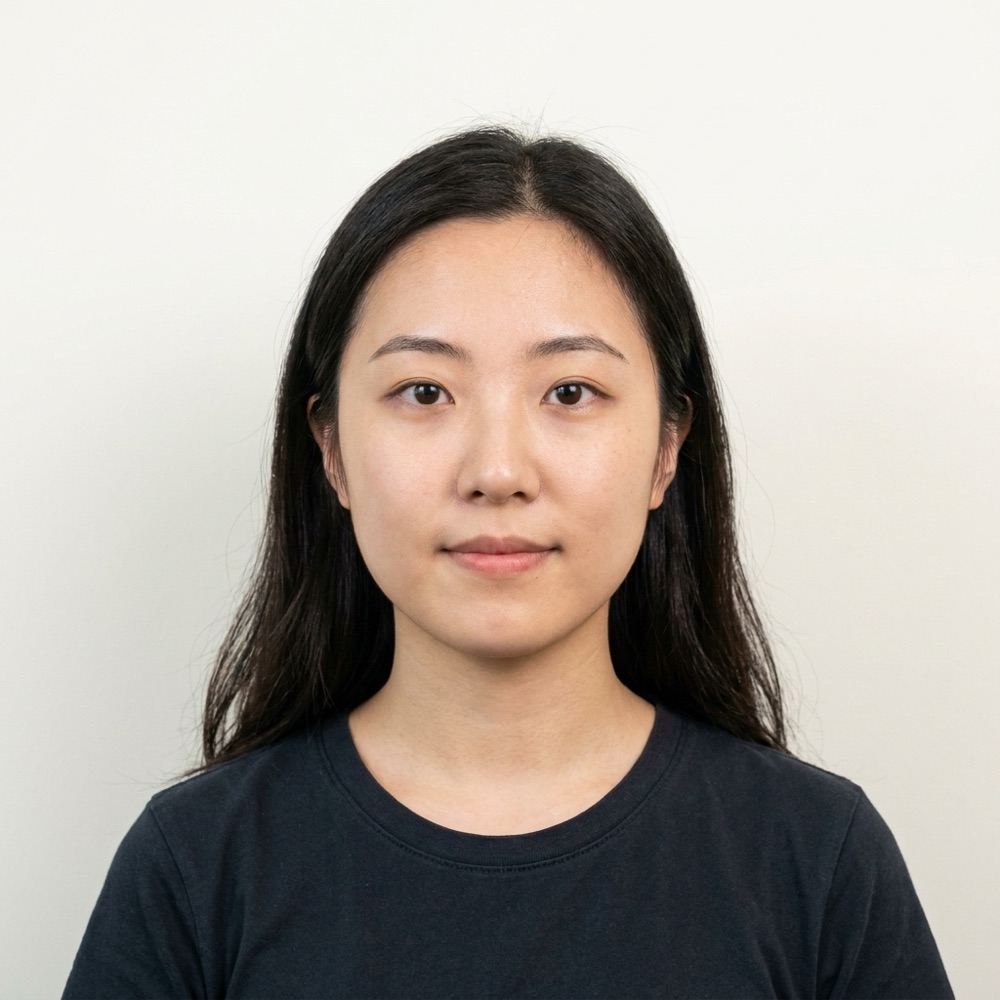
What does an AI passport photo tool actually do?
An AI passport photo tool reads the geometry of a face in your photo — eye line, chin, crown — and uses it to build a compliant frame: a 2 x 2 inch square with the head centered and sized between 1 and 1 3/8 inches from chin to top of head, which is the U.S. specification. Around that core crop math, tools layer extra capabilities: background evaluation, lighting checks, print-sheet layout on a 4 x 6 canvas, and automated warnings when something looks off (tilted head, closed eyes, shadows). Some tools go further and generate new imagery — re-posing an angled face to straight-on or painting in a white background. Those two tiers are very different in the eyes of the U.S. State Department, and knowing which tier you are using is the whole game.
What is the difference between formatting a photo and editing it?
Formatting means selecting and arranging the pixels your camera captured: cropping to 2 x 2, resizing for upload, placing copies on a 4 x 6 print sheet. Editing — in the sense the State Department cares about — means changing those pixels: smoothing skin, brightening teeth, rotating a face, replacing a background, applying filters. The official guidance on travel.state.gov says to "submit the original, unedited photo without filters or digital changes," and the online renewal page adds: "Do not use a photo you created or edited using artificial intelligence or other digital tools."
| Operation | What it does | OK for U.S. passport submission? |
|---|---|---|
| Crop to 2 x 2, resize | Selects existing pixels | Yes — every photo is cropped |
| Print-sheet layout (4 x 6) | Arranges copies for printing | Yes |
| Compliance checks / warnings | Analyzes, changes nothing | Yes |
| Background replacement | Generates new pixels | Risky — retake against a real plain wall instead |
| Skin smoothing, filters | Alters appearance | No |
| AI re-posing / face rotation | Synthesizes a new face view | No — counts as an AI-edited photo |
Are AI-edited photos allowed for U.S. passport applications?
No. The State Department's current guidance explicitly names artificial intelligence: photos created or edited with AI tools are not acceptable for passport applications, and the general photo page requires the original, unedited image with no filters or digital changes. The online renewal system also runs an automated check on every uploaded photo — per the official upload page, "the photo tool will check if your photo meets the basic requirements" and tells you what to change if it fails. In short: AI-generated passport photos are a real capability, and also a real rejection risk if you submit one to the U.S. government. Use generative output where edited images are acceptable, and use an unedited original for the application itself.
How does the process work, step by step?
Here is the typical flow when you run a photo through a tool like Passport Photo AI:
- Upload a clear, front-facing photo — ideally taken against a plain, light wall.
- Face detection locates your eyes, chin, and crown to establish head height and center.
- Crop math builds the 2 x 2 inch square so your head lands in the 1 to 1 3/8 inch band.
- Quality checks flag issues: shadows, busy background, tilt, low resolution, closed eyes.
- Export gives you a digital square for online upload and a 4 x 6 print sheet holding multiple 2 x 2 photos for cheap pharmacy printing.
The safest workflow keeps the pixels untouched: a real photo in, a correctly cropped and sized version of that same photo out.
When is an AI-generated passport-style photo actually useful?
Generative output — a re-posed, background-swapped render — is useful anywhere an edited image is acceptable: profile pictures, employee badges, membership cards, resumes, previews of how a compliant photo should look, or simply checking whether your framing and head size are in the right zone before you take the real shot. It is not the thing to upload to a U.S. passport application. That distinction is why a compliance-aware tool matters: it should tell you which output is which, apply the official crop and sizing to your unedited original, and leave your face alone in anything meant for submission.
What should you double-check before submitting any tool's output?
Before you print or upload, verify the result against the official checklist yourself: taken in the last 6 months, in color, plain white or off-white background free of shadows and objects, neutral expression with both eyes open and mouth closed, no glasses, head centered and fully visible, and no filters or digital changes to your appearance. If your source photo could not meet those conditions without generative help, the honest answer is to retake it — a phone, a plain wall, and daylight take two minutes. See our guide to taking a passport photo at home with an iPhone for the setup.
FAQ
Can AI really make a passport photo from a casual picture?
Technically yes. Modern image models can center a face, replace a background, and frame a 2 x 2 crop from an ordinary photo in seconds. Whether you can submit that result is a separate question: for U.S. passport applications, official guidance says to submit the original, unedited photo without filters or digital changes.
Is it against the rules to use an AI passport photo tool?
Using software is fine. What matters is what the software does. Cropping, resizing, and laying out a print sheet do not change your appearance. Generative edits — re-posed faces, swapped backgrounds, smoothed skin — conflict with the State Department's instruction to submit an unedited photo.
How long does AI passport photo generation take?
A few seconds per photo. You upload an image, the tool detects your face, applies the 2 x 2 crop geometry, and returns a digital square plus a 4 x 6 print sheet you can download immediately.
Does cropping a photo count as digital alteration?
No. Every passport photo is cropped — a booth camera does the same thing optically. Cropping and resizing select pixels; they do not invent or change them. The line is appearance: edits that change how you look are the problem.
Will an AI tool guarantee my photo is accepted?
No tool can. Acceptance is always decided by the passport agency or acceptance facility, and no software — AI or otherwise — can promise an official outcome. Treat any tool's output as a draft you verify against the official requirements.
How Passport Photo AI helps
Passport Photo AI turns an everyday photo into a passport-style crop or print sheet. It centers the face, sizes the head to the official 2 x 2 geometry, flags likely compliance problems like shadows or tilt, and exports both a digital square and a 4 x 6 print layout. It does not alter your appearance in the submission workflow, and the final decision always belongs to the passport agency or acceptance facility — verify your photo against the official requirements before you submit it.